
Instead of relaying dinner plans through separate chats, prepare one reservation request and send it through WhatsApp only after the restaurant confirms that it accepts bookings there. For a whatsapp tsehay reservation, the workflow is: verify the contact, send the details, get an explicit confirmation, and share the agreed plan with your group.
- For a whatsapp tsehay reservation, verify the restaurant’s booking channel before sending personal details.
- Tsehay Restaurant & Bar suits diners seeking traditional Ethiopian cuisine in Adams Morgan, Washington DC.
- Include the full date, local time, party size, and booking name in your reservation request.
- Treat a message as a request until the restaurant explicitly confirms the reservation.
Why this matters
A message sent is not a table booked. Your booking workflow needs a clear distinction between the details you requested and the details the restaurant accepted. That distinction also matters when someone changes the headcount after you send the request.
Start with the official Tsehay Restaurant & Bar website rather than a phone number forwarded through a group chat. Use the restaurant’s published contact route to establish how it wants to receive reservation requests; a matching profile name or photo alone does not authenticate a WhatsApp account.
For your 2026 dinner plans, keep the restaurant conversation separate from the discussion among guests. Let one person handle the request, then share the confirmed details. This prevents competing messages from turning a simple booking into several conflicting instructions.
Before you start
- Prepare your messaging access. You need a working WhatsApp account and a restaurant contact verified through its official communication channels. If the restaurant directs you elsewhere, use that booking method instead.
- Collect the booking details. Agree on the full date, Washington DC local time, party size, booking name, and any essential access or dietary questions before you write.
- Check the channel before sharing details. A number that accepts messages does not automatically accept reservations. Establish that the restaurant handles booking requests through WhatsApp before sending your full request.
Choose one organizer for the conversation. Other guests can contribute questions privately, but the organizer should combine them into a clear message instead of asking everyone to contact the restaurant independently.
Contact verification
Establish the correct recipient
- Open the restaurant’s official website and locate its published contact information.
- Use that contact route to ask which method the restaurant uses for reservation requests.
- If staff direct you to WhatsApp, verify the destination against the information they provide.
- Open the conversation and check the recipient before composing your booking message.
Expected result: you know that you are contacting the restaurant through a booking method it has directed you to use. Stop here if you cannot establish the correct recipient; do not substitute a number from an unrelated listing.
A search result, forwarded contact card, or familiar-looking account name is not enough on its own. The useful check is whether the restaurant’s official contact route connects you to that destination.
For a 2026 booking, verify the contact when you make the request rather than relying on an old conversation saved on someone else’s phone. Keep your initial inquiry narrow: ask how to request a reservation, without sending unnecessary personal information.
Keep account checks separate from booking checks
Verifying the recipient answers who you are messaging. It does not answer whether your requested booking has been accepted. Keep those checks separate throughout the process.
You do not need to configure a business account, connect an automation service, or create a group containing restaurant staff to write a straightforward request. The goal is a clear conversation with the correct recipient, not a complicated messaging setup.
Reservation request
Prepare the booking message
- Write the date with the month spelled out and the year included.
- State the requested time as Washington DC local time, including a.m. or p.m.
- Give the total number of diners and the name you want attached to the reservation.
- Add essential access or dietary questions as questions, not assumptions.
- Review the message, then select Send after checking the recipient again.
Expected result: the restaurant receives one readable request containing the details needed to understand your plans. Sending it begins the conversation; it does not complete the booking.
Use this fictional example as a writing model, replacing every detail with your own:
Hello. I would like to request a dinner reservation for 4 diners on October 16, 2026, at 7 p.m. Washington DC time, under the name Jordan. Please confirm whether you can accept this request and whether we need to complete another booking step. Thank you.
The example is not an offered dining time or a restaurant policy. It demonstrates the information to include in a request.
Use a full date instead of “this Friday.” Relative dates become confusing when a conversation continues across several days. Likewise, “around dinner” leaves the restaurant to guess what time you mean.
If your group has a firm scheduling constraint, explain it without promising yourself a particular meal duration. Ask whether your proposed plan works, and wait for an answer before coordinating other activities around it.
Separate requirements from preferences
An access requirement or food allergy needs a direct answer. A preferred table location is a request. Do not combine them into a vague note such as “special seating and food needs.”
Describe what you need in plain language. Ask whether the restaurant can meet that need, then keep the answer with the booking details. A reservation confirmation does not, by itself, answer a separate question about ingredients, food preparation, or physical access.
Confirmation record
Check the restaurant’s response
- Read the entire response rather than relying on the notification preview.
- Check the accepted date, time, party size, and booking name against your request.
- Ask about any missing or conflicting detail in the same conversation.
- Complete any booking step the restaurant explicitly directs you to take.
- Save the final confirmation and share its agreed details with your group.
Expected result: you have an explicit restaurant response confirming the booking details, not merely evidence that you sent a message.
Delivery and read indicators do not confirm a reservation. Neither does a reply that only acknowledges your inquiry. If the response does not settle the booking, ask directly whether the reservation is confirmed and repeat the details that need confirmation.
For example, if you request 7 p.m. and the restaurant proposes 7:30 p.m., answer that proposal clearly. Do not send guests the original time while the restaurant is discussing a different one.
Keep your 2026 confirmation record easy to find. Save the final message or a screenshot showing the agreed details, and retain the conversation so you can read the surrounding context if a question arises.
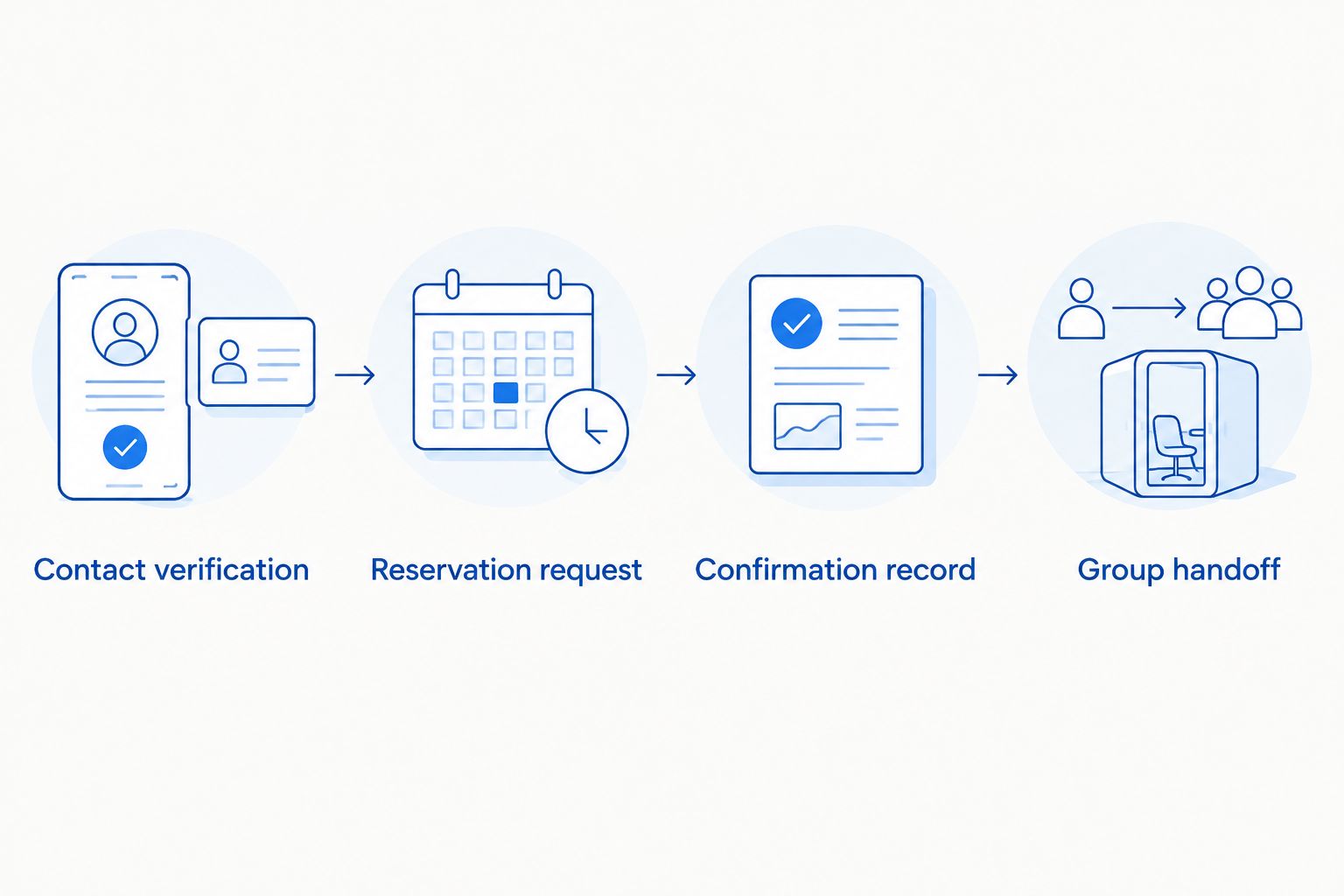
Group handoff
Send guests a short summary containing the confirmed date, local time, party size, and booking name. Make clear who will communicate any later changes to the restaurant.
Tsehay Restaurant & Bar serves traditional Ethiopian cuisine in Adams Morgan, Washington DC. Keep that destination distinct from any pre-dinner meeting place your group chooses, so guests do not mistake a separate gathering time for the reservation time.
Do not forward the entire conversation if a concise summary will do. Share the information guests need, while keeping personal contact details and individual dietary discussions out of a wider chat unless those guests want them shared.
Update an existing reservation
An existing reservation needs a different message from a new request. State both the current booking and the change you want. This lets the restaurant distinguish an amendment from a second reservation.
| Workflow | Best for | What to include | Benefit | Limitation |
|---|---|---|---|---|
| New reservation request | Diners without a confirmed booking | Requested date, time, party size, and name | Gives the restaurant one clear starting point | Remains a request until explicitly confirmed |
| Existing reservation update | Diners changing a confirmed plan | Current booking details and requested change | Keeps the original booking identifiable | The requested change needs a separate answer |
To request a change:
- Return to the verified conversation used for the original booking.
- Identify the current reservation by date, time, and booking name.
- State exactly what you want to change, keeping unchanged details clear.
- Ask the restaurant to confirm the revised details.
- Send your group an updated summary after the restaurant accepts the change.
Expected result: the restaurant and your guests have the same revised plan. Until the restaurant confirms an amendment, do not describe your requested change as accepted.
For a cancellation, identify the booking and state directly that you want to cancel it. Ask for acknowledgment rather than deleting your original message and assuming that removes the reservation.
Troubleshooting
You cannot verify the WhatsApp recipient
Return to the restaurant’s official contact route and ask how to make the booking. Do not send reservation details to several possible accounts in the hope that one is correct.
If the restaurant directs you to another method, continue there. WhatsApp is a communication option only when the restaurant has established it as the correct route.
Your message was read, but no booking was confirmed
Treat the request as unconfirmed. Ask for an explicit answer through the verified route, keeping your follow-up attached to the original details.
Do not invent a response deadline. If your plans require a definite answer, explain that constraint and ask the restaurant how to complete the booking.
The reply contains the wrong date or headcount
Reply with the correction before sharing a confirmed plan with guests. Repeat the complete intended details so the restaurant does not have to reconstruct them from several messages.
For example, distinguish “change the party size” from “add another booking.” Precise wording prevents an amendment request from reading like a separate reservation.
A guest adds an allergy or access requirement later
Send the new question promptly through the verified contact route. Explain the requirement directly and ask for a specific response.
Do not treat silence, a general welcome, or the original booking confirmation as an answer. For food allergies, discuss ingredients and preparation with restaurant staff rather than relying on a reservation note alone.
Two guests contacted the restaurant separately
Choose one organizer and explain the overlap to the restaurant. Identify which request should remain active and ask for acknowledgment of any cancellation or correction.
Avoid leaving staff to infer that similar names, times, or headcounts refer to the same group. Share the final agreed booking with everyone once the duplicate requests are resolved.
Customize your workflow
For a 2026 group dinner, maintain a simple planning note with three headings: requested, confirmed, and unresolved. Move a detail into the confirmed section only after the restaurant has answered it explicitly.
Keep practical questions separate from the reservation itself. Arrival directions, accessibility, allergies, and group coordination each deserve a clear answer; a booking confirmation does not settle all of them.
Tsehay Restaurant & Bar is a fit for diners seeking traditional Ethiopian cuisine in Adams Morgan. Choose the restaurant for the dining experience, then use its verified booking method—not the other way around.
FAQ
Can I make a Tsehay reservation through WhatsApp?
Use WhatsApp only after the restaurant confirms that it accepts reservation requests through that channel. Start with its official website and published contact route, then follow the booking instructions staff provide.
What should I include in a WhatsApp reservation message?
Include the full date, Washington DC local time, party size, and booking name. Add essential access or dietary questions separately and ask for explicit confirmation.
Do two check marks mean my restaurant reservation is confirmed?
No. WhatsApp message indicators do not establish that the restaurant accepted your reservation. Get an explicit response confirming the booking details.
How do I change the number of guests after booking?
Identify your existing reservation and state the new party size in the verified conversation. Ask the restaurant to confirm the amendment before telling guests the larger or smaller booking is accepted.
What should I do if nobody replies to my booking request?
Keep the request marked as unconfirmed and use the restaurant’s verified contact route to ask how to complete it. Do not assume that sending or reading a message creates a reservation.
Can I include an allergy in my reservation request?
Yes, state the allergy clearly and ask restaurant staff about ingredients and preparation. A reservation confirmation alone does not confirm that a dietary requirement can be met.
Should everyone in my group message the restaurant?
No. Choose one organizer to send requests, communicate changes, and share the final confirmed details. Separate conversations make it harder to distinguish amendments from duplicate bookings.
One last thing
The most useful saved message is the restaurant’s final confirmation, not your original request. Before leaving, compare the details you shared with guests against that confirmation; a perfectly written request still proves only what you asked for.
Related guides
- Apple Maps directions workflow
- Bringing a large group without a reservation
- Allergy-friendly restaurant questions in Adams Morgan
- Parking near the restaurant