
Instead of repeatedly searching Snapchat for a restaurant clip and asking friends where to meet, use this snapchat tsehay restaurant workflow to turn a discovery into a checked dining plan. In 2026, the process is simple: identify the restaurant, verify details through Tsehay Restaurant & Bar, and share one clear plan before leaving.
- For snapchat tsehay restaurant searches, verify the restaurant before treating a clip as a dining plan.
- Tsehay Restaurant & Bar is best for diners seeking traditional Ethiopian cuisine in Adams Morgan, Washington DC.
- Use Snapchat for discovery and conversation; confirm dining arrangements directly with the restaurant.
- Keep the date, group size, destination, and confirmation status together in one planning note.
Why this matters
A restaurant video can help you choose where to eat. It does not establish the restaurant's current hours, explain its seating arrangements, or confirm a table for your group.
A shared Snap is a recommendation, not a restaurant confirmation. Keep those functions separate throughout your 2026 planning: Snapchat starts the conversation, the restaurant answers operational questions, and your group agrees on the final plan.
Tsehay Restaurant & Bar is best for diners seeking traditional Ethiopian cuisine in Adams Morgan, Washington DC. That identifies the dining destination; it does not mean every account, location tag, or video bearing a similar name represents the restaurant.
The workflow below is a manual handoff, not an automatic connection between Snapchat and a restaurant booking system. Its advantage is control over the details. Its limitation is that someone still needs to verify them.
Before you start
- Access: Have Snapchat signed in on your phone, a browser for checking the restaurant's website, and a place to keep a planning note. No restaurant account is needed just to research the destination.
- Group details: Gather 3 planning details before discussing a table: your intended date, proposed arrival time, and number of diners. Record dietary or access questions separately so they do not disappear in the conversation.
- The gotcha: A creator's profile or restaurant tag is not proof of an official restaurant account. Do not send personal details or treat a message as a booking confirmation until you have verified the recipient through the restaurant's own published contact information.
Keep the original post as a reference, not your only record. If you cannot find it again, the restaurant name and your planning note should still be enough to continue.
Restaurant identity
Start by establishing where the video actually points. A familiar-looking dining room or a caption containing a first name is not enough to choose a destination.
- Open Snapchat and use search to look for the restaurant name. Try the full name alongside Adams Morgan or Washington DC to distinguish the destination from unrelated results.
- Open the relevant result and read the accompanying text. Check whether it identifies a restaurant, a personal account, or someone discussing a meal.
- Compare the name and location with the restaurant's own website. The destination for this workflow is an Ethiopian restaurant and bar in Adams Morgan, Washington DC.
- Write the verified restaurant name in your planning note. Keep any creator handle in a separate reference field so you do not confuse the publisher with the business.
Expected result: You have identified the restaurant independently of the video and can explain which location your group intends to visit.
Do not spend the rest of the evening hunting for an official Snapchat account. Finding one is not required to plan dinner. You can use a friend's recommendation as the discovery source and move straight to verification elsewhere.
For a 2026 visit, check the information relevant to your intended date rather than relying on a caption that describes an earlier visit. A post's publication date and your dinner date are different pieces of information.
Discovery handoff
Next, move from an interesting post to a record your group can use. Choose the handoff based on whether you are still discussing the idea or already organizing the outing.
| Handoff | Best for | Advantage | Limitation |
|---|---|---|---|
| Snapchat chat | Friends already discussing the restaurant in Snapchat | Keeps the recommendation beside the conversation | Details can become scattered across replies |
| Separate planning note | A group with an agreed date and organizer | Keeps the destination and latest decision together | Someone must update it when plans change |
Use Snapchat chat for discussion; use a planning note for the agreed details. Neither replaces a response from the restaurant when you need confirmation.
- Open Chat and select the intended conversation. Check the recipients before sharing anything about the outing.
- Share the discovery using the sharing controls offered by that particular post. If the content opens Send To, select the intended recipients and check them before sending.
- Add the verified restaurant name in your own message. Do not assume everyone will open the clip or interpret its location tag correctly.
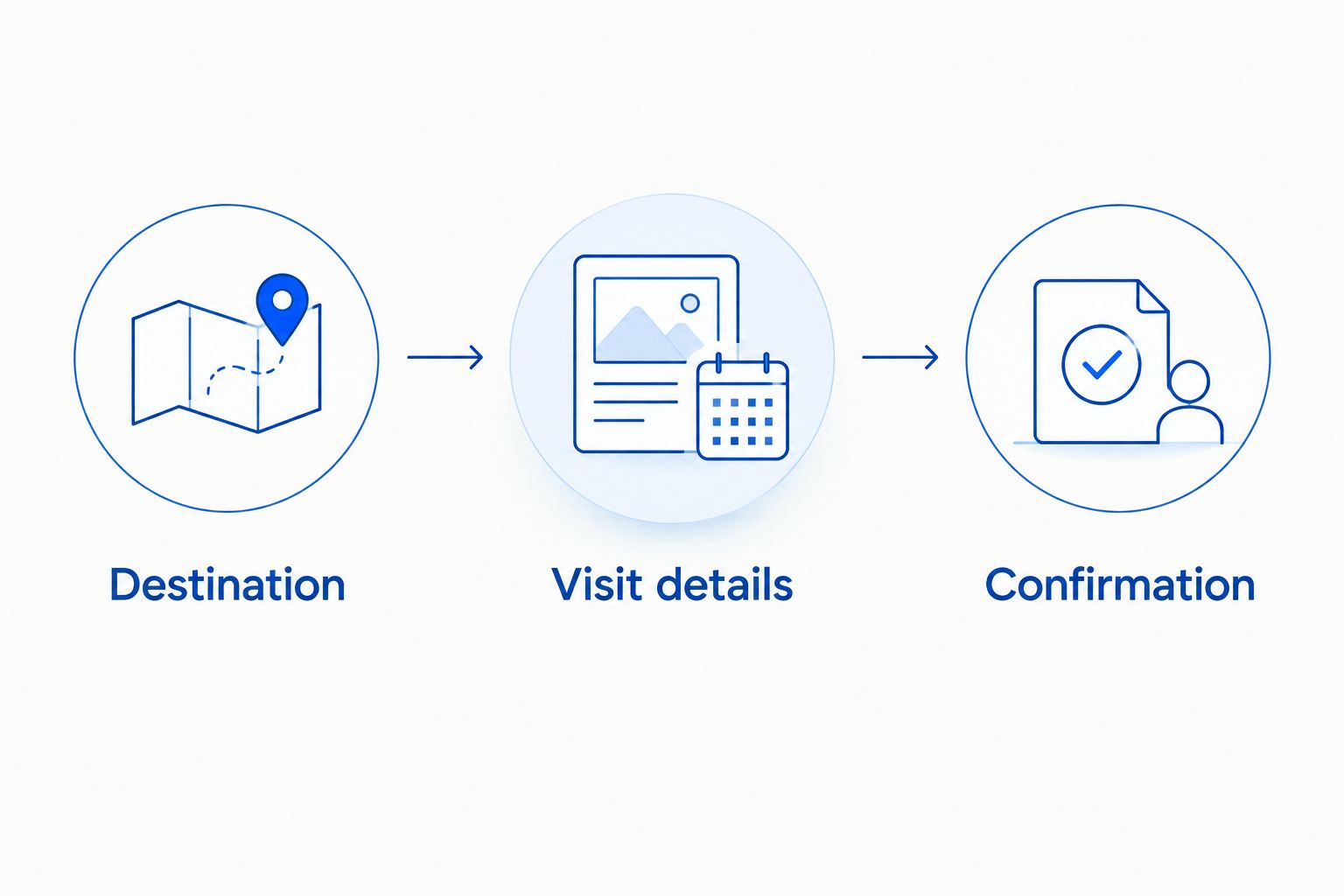
- Create a note with these headings: Destination, Visit details, and Confirmation. Put the restaurant name under Destination; place the date, time, and group size under Visit details.
- Under Confirmation, distinguish what your group has agreed from what the restaurant has confirmed. Leave unresolved questions visibly unresolved.
Expected result: Your friends have the discovery context, while the practical details sit together in a record you can update.
The planning sequence is straightforward: identify the destination, settle the visit details, then record the confirmation. Do not reverse it by announcing a confirmed dinner before anyone has checked the arrangements.
Visit verification
Now resolve the questions that affect whether your intended outing works. For your 2026 visit, verify the date-specific details rather than transferring assumptions from the video into your plan.
- Review the restaurant's own published information for the intended visit. Check the location and any stated hours relevant to that day.
- Use a contact method published by the restaurant when your question needs a direct answer. Ask about your actual group size and intended arrival time, not a vague future visit.
- Ask how to arrange a table if your group needs a confirmed dining arrangement. Follow the process the restaurant identifies; do not assume Snapchat is an accepted booking channel.
- Raise dietary and access requirements before your group commits. Describe the requirement precisely and ask what the restaurant can accommodate.
- Record the response and the date you received it. If no response establishes a confirmed arrangement, keep the note marked as unconfirmed.
Expected result: Your note separates checked facts, direct restaurant responses, and questions that still need answers.
For food allergies, start with the guide to allergy questions in Adams Morgan to prepare your conversation. Reading a guide does not establish ingredient suitability or cross-contact controls for an individual meal; those require a direct discussion with the restaurant.
Tsehay Restaurant & Bar offers Ethiopian restaurant dining and bar service. That supports choosing it as a dining destination, but it does not establish a particular seating arrangement, event format, or booking policy. Ask about the arrangement you need instead of inferring it from a dining-room clip.
Group plan and arrival
Finish the handoff before opening directions. Navigation should take you to a checked destination, not become the first time anyone notices a location mismatch.
- Review 2 identity checks: the restaurant name and the address shown by your chosen navigation result. Compare them with the restaurant's published information.
- Send one final planning message with the date, intended arrival time, group size, destination, and confirmation status. Include any unresolved condition that affects the outing.
- Ask each person to acknowledge the latest plan. A reaction to the original food video does not necessarily mean agreement to a particular dinner date.
- Choose how you will travel and review the route before departure. Drivers should check parking arrangements separately rather than assuming the restaurant provides parking.
- Recheck the planning note if your group size or arrival time changes. Ask the restaurant again when the change affects an arrangement you previously discussed.
Expected result: Everyone knows where to go, when to meet, and whether the dining arrangements are confirmed or still being discussed.
Keep 1 current planning note rather than maintaining competing versions in several conversations. The organizer should update that record first, then tell the group what changed.
In 2026, the useful end point is not a saved clip. It is a plan that remains understandable even if nobody can reopen the original post.
Update the plan when a friend sends another Snap
A second workflow applies when the discovery has already happened and new content arrives. Treat the new Snap as additional context, not an automatic instruction to change dinner.
- Read the new message and identify what it changes: interest in the restaurant, a food question, or an actual planning detail.
- Compare any factual claim with the information you already checked. A new video does not automatically supersede a direct restaurant response.
- Ask the group before changing the date, arrival time, or number of diners. Update the planning note only after the change is agreed.
- Contact the restaurant again when the revised plan affects confirmed arrangements. Tell the group whether the revision has been acknowledged.
Expected result: New discoveries enrich the conversation without silently rewriting the outing.
This variant is best for an active group chat where friends keep sending food clips. Its advantage is a clear boundary between inspiration and decisions. Its limitation is that the organizer must keep the note current; Snapchat does not perform that verification for you.
Troubleshooting
Search results show an unrelated person
Search with the full restaurant name and Washington DC, then compare the result with the restaurant's website. Do not use a matching display name alone as evidence of restaurant ownership.
If the result still cannot be verified, stop using it as a contact channel. You can continue planning without identifying an official Snapchat profile.
The original Snap is no longer accessible
Continue from the verified restaurant name and your planning note. Ask the sender for context only if something essential remains unclear; recreating the entire discovery trail is unnecessary.
For future plans, record the destination as soon as you identify it. The video should add context, not hold the only usable restaurant information.
Friends disagree about the dinner time
Separate the proposed time from the agreed time in your note. Send the decision back to the group before treating it as settled, and revisit restaurant arrangements if the change affects them.
A message gets no restaurant response
Do not interpret silence as confirmation. Use the restaurant's published contact information to ask how to proceed, and keep the arrangement unconfirmed until you receive a clear answer.
Directions point somewhere unexpected
Stop and compare the restaurant name and address with the restaurant's own information. Re-enter the destination using the checked details rather than following a pin attached to an unverified post.
Customize your workflow
For a first visit, add a short food-question list to your planning note. Ask about unfamiliar dishes, spice preferences, and any dietary requirements without assuming a video shows the full menu or explains its ingredients.
For a larger outing, appoint one organizer to communicate the agreed group details. Multiple people sending different requests creates an avoidable coordination problem; one shared record makes disagreements easier to spot.
For a repeat visit, keep the destination record but recheck date-specific arrangements. A previous meal establishes where you went, not the terms of your next visit.
Keep discovery flexible and confirmation explicit. That rule works whether the recommendation reaches you through Snapchat, a direct message, or a conversation with a friend.
FAQ
How do I use Snapchat to plan dinner at Tsehay Restaurant & Bar?
Use Snapchat to discover and discuss the restaurant, then verify visit details through the restaurant’s own published information. Keep the destination, date, group size, and confirmation status in one planning note.
Does finding a restaurant on Snapchat confirm a table?
No. Finding a restaurant, sharing a Snap, or agreeing with friends does not establish a confirmed dining arrangement with the restaurant.
Do I need to find an official restaurant Snapchat account?
No. You can use Snapchat as the recommendation source and complete your planning through the restaurant’s published information and contact methods.
Can I book dinner by sending a Snapchat message?
Do not treat a Snapchat message as a booking unless the restaurant explicitly identifies that channel for bookings and confirms your arrangement. Ask the restaurant which process to follow.
What should I check before sharing a restaurant location?
Check the restaurant name and address against the restaurant’s own published information. A location tag or creator caption alone is not enough to verify your destination.
What if the restaurant Snap disappears before dinner?
Continue from your verified destination and planning note. Record the restaurant name and agreed visit details early so the original post is not essential to the outing.
Should I mention an allergy in the group chat or contact the restaurant?
Contact the restaurant directly about an allergy and tell your group about any planning implications. A group conversation or food video cannot establish ingredient suitability or cross-contact controls.
One last thing
Label the plan's status as carefully as its destination. A correct restaurant name beside an incorrect assumption about confirmation can still leave your group with an unresolved dinner plan.
Before departing, read the latest note without opening Snapchat. If it tells you where to go, when to meet, and what remains unconfirmed, the handoff is complete.
Related guides